


How Do I Properly Update My WordPress Site?


Many people were not familiar with PHP, until last month. On October 21, PHP released an emergency update, because any web servers using it were vulnerable to a complete remote compromise, by anyone on the Internet. Millions of web servers around the world scrambled to update.
PHP is the language used for many common web site content management programs, including WordPress and Drupal. These allow easy modifications of site content, new posts, etc., via a web browser. Since these are very common, with open source code, they are also common hacker targets.
ITS strongly believes any publicly-accessible software, such as a web server, should be kept up to date. While the immediate focus last month was on a flaw in PHP itself, the topic raised several questions from clients about updating software such as WordPress.
WordPress Recommendations
WordPress officially recommends all sites always stay up to date with the latest version, currently 7.1, and the recommended version of PHP, currently 8.3 or later. As they put it, "The only current officially supported version is the last major release of WordPress. Previous major releases before this may or may not get security updates as serious exploits are discovered." [our underlining]
WordPress plugins (third-party add-ons) also frequently receive security updates. However, some already require newer versions of WordPress and/or PHP. For example the popular "Contact Form 7" plugin currently requires both PHP 8.3 and WordPress 7.1. As a result, sites running older versions of PHP or WordPress will not be offered a pending update to this plugin. However, security flaws may remain unpatched in older, out-of-date plugin versions.
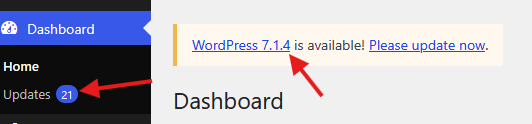
Sites needing upgrades should see messages inside the WordPress admin panel.
This one shows both a new WordPress version, as well as other updates to plugins and themes:
This one shows the site should be changed to a newer PHP version:

Automatic Updates
ITS's web hosting control panel emails the account holder when it finds security concerns for a site's WordPress and its plugins. Our control panel can be set to install security updates, or all updates, to plugins and themes, however that depends on compatibility as mentioned above. It can also auto-install updates, or just security updates, to WordPress itself. ITS can assist with enabling this if desired. Updates can also be installed by the web developer, logged in to the WordPress admin panel. However the control panel cannot change PHP versions on its own.
Upgrading From Very Old Versions
For those upgrading from old versions, WordPress maintains a matrix of PHP versions and compatible WordPress versions, to get to WordPress 7.1 and PHP 8.3+. Each site's configured PHP version can be changed in our web hosting control panel. ITS can also assist with this. It is possible very old themes or plugins may not be compatible with newer PHP or WordPress. In this case the PHP version can be easily changed back, until the problem code is updated. If a plugin is old and unmaintained, it is time to find a newer, supported solution.
Backups
Of course, backups are always a good idea when making changes. ITS backs up all web servers we host, daily. There are also backup options inside each server's control panel, or there are various WordPress backup plugins. Be aware space used for those types of backups counts against the account's disk space quota.
November 2026
Send this article to a friend!
Subscribe to The ITS Connection
Related articles